Qirox app icon Qiroxfor Android

Scan, create and organize QR codes and barcodes — offline, on your phone.

Qirox is a QR code reader, barcode scanner, QR code generator and label maker in one app. It opens straight to the camera, and your scans and codes stay on your device.

  • Works offline
  • No account
  • Camera is the only permission it asks for
  • Android 8.0+

Free, contains ads. English interface.

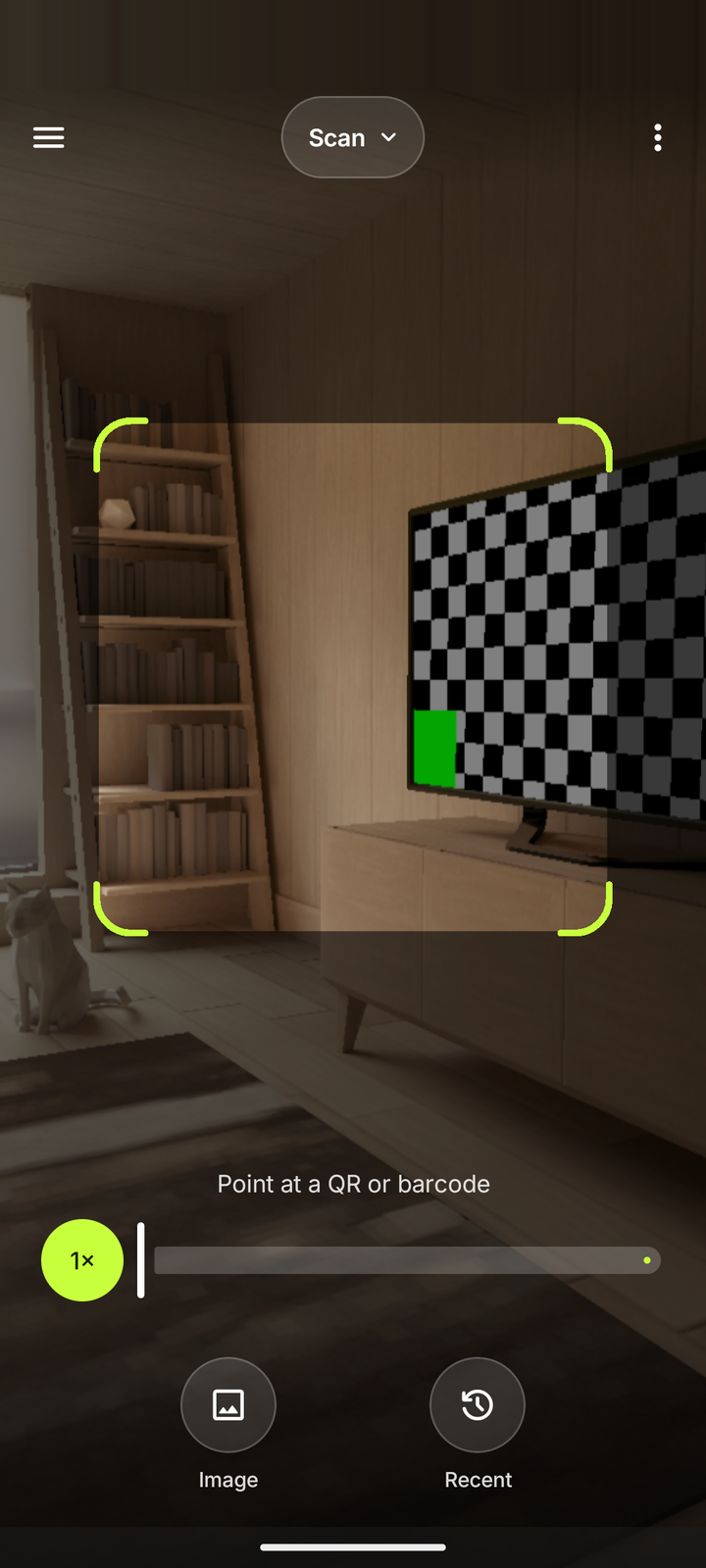
Qirox screenshot: the camera scanner, which is the first screen when the app opens

Screenshots

A closer look

From the camera to the label printer, every screen is built for one-handed use.

Qirox screenshot: the camera scanner, which is the first screen when the app opens
ScannerOpens straight to the camera.
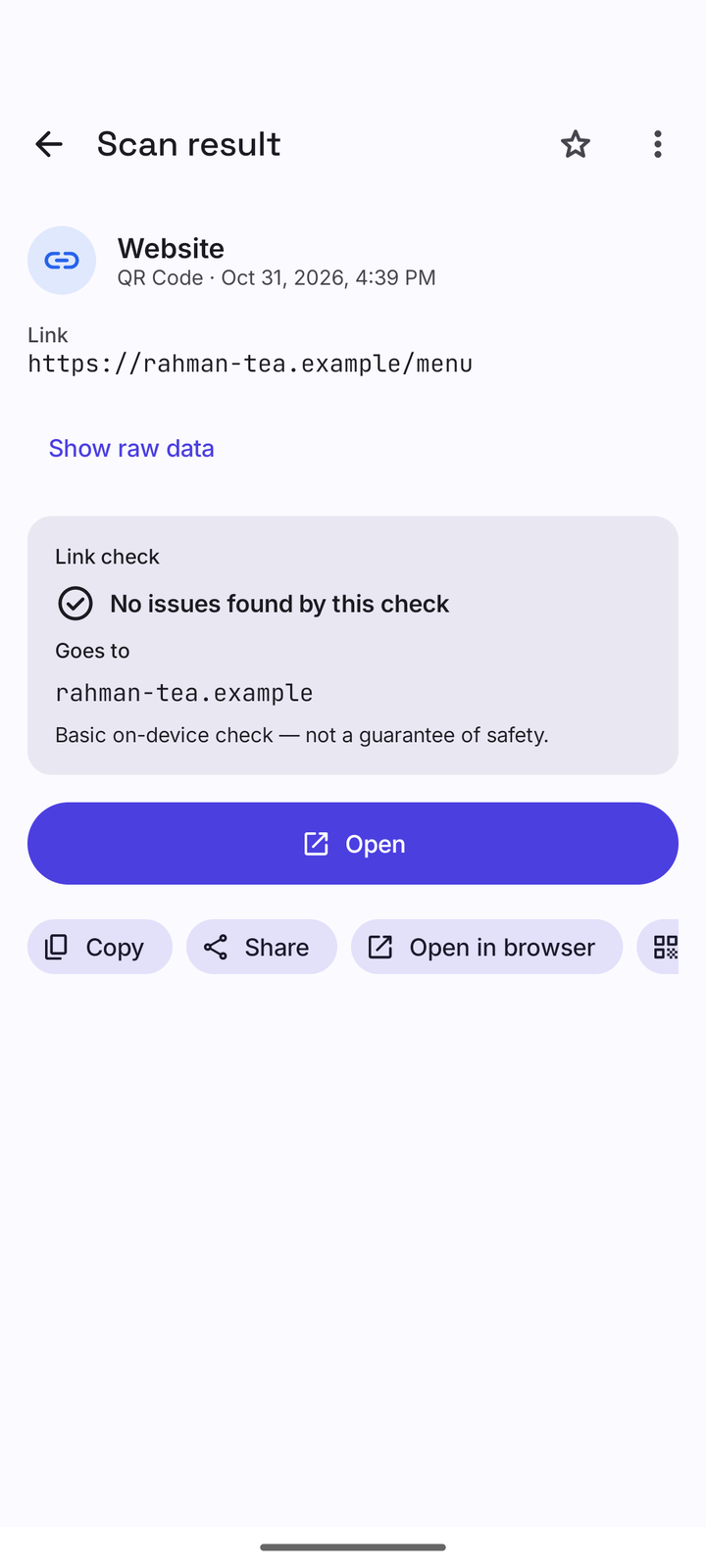
Qirox screenshot: a scan result with actions and the on-device link check
ResultContent-aware actions and a basic link check.
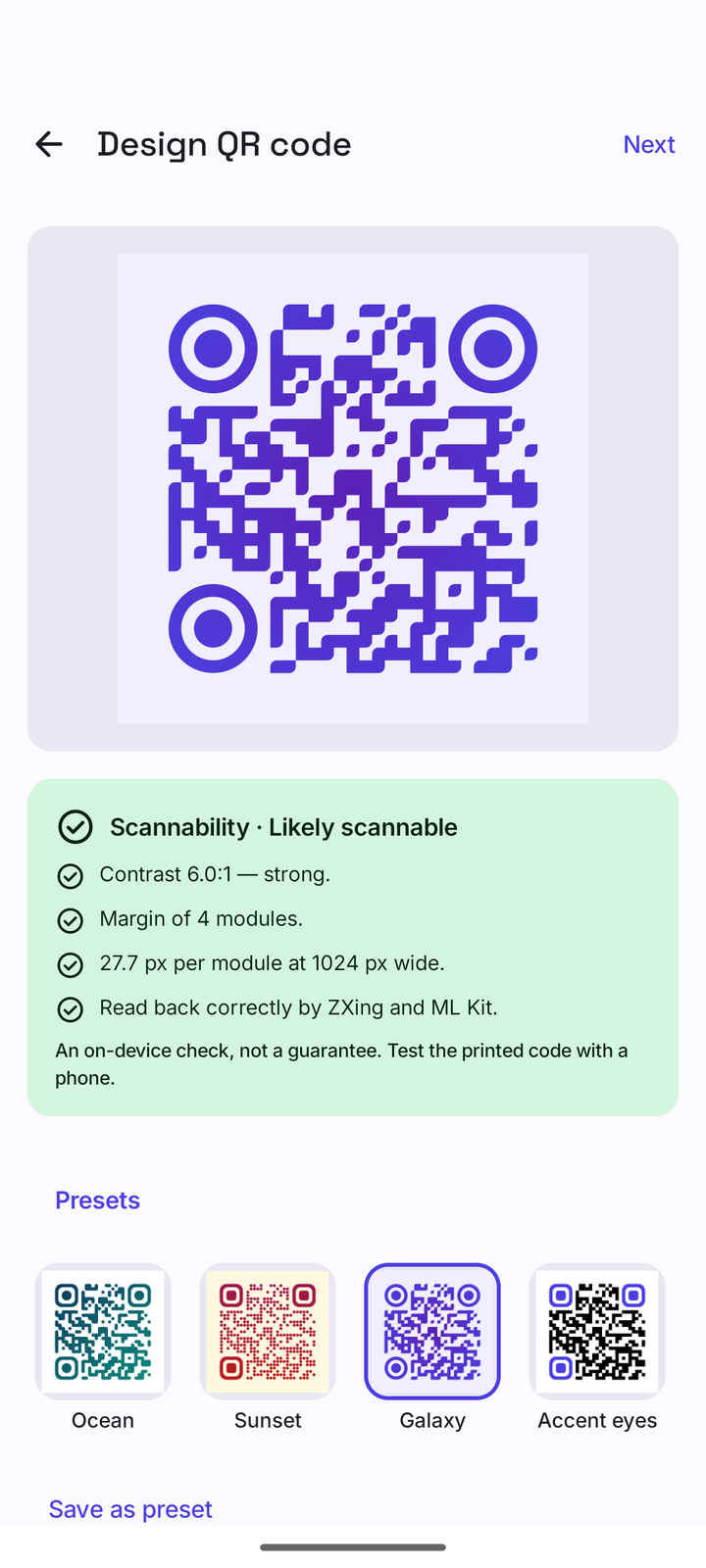
Qirox screenshot: the QR code designer with style options and the quality meter
DesignerStyles, colours, logo and frames, with a quality meter.
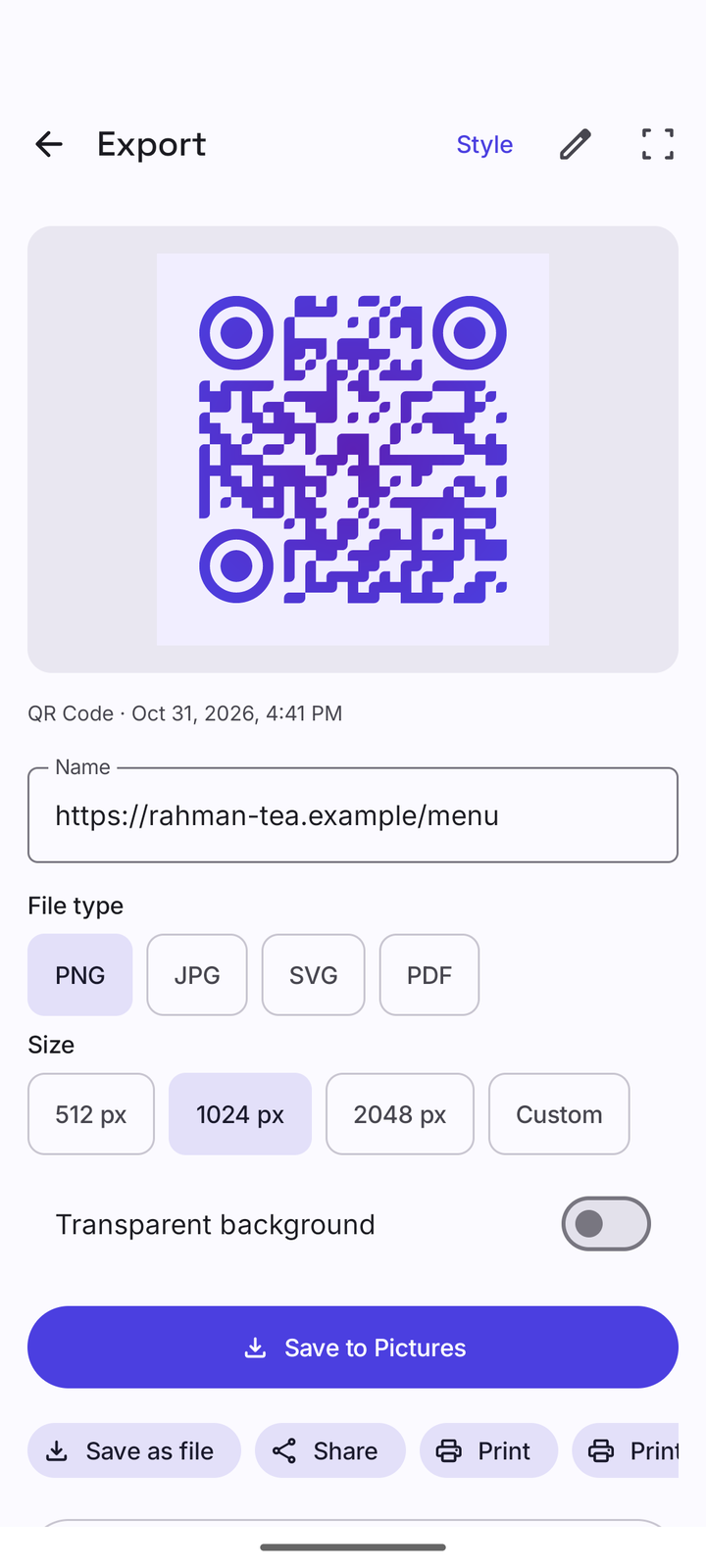
Qirox screenshot: exporting a created code as an image or PDF
ExportPNG, JPG, SVG or PDF — save, share or print.
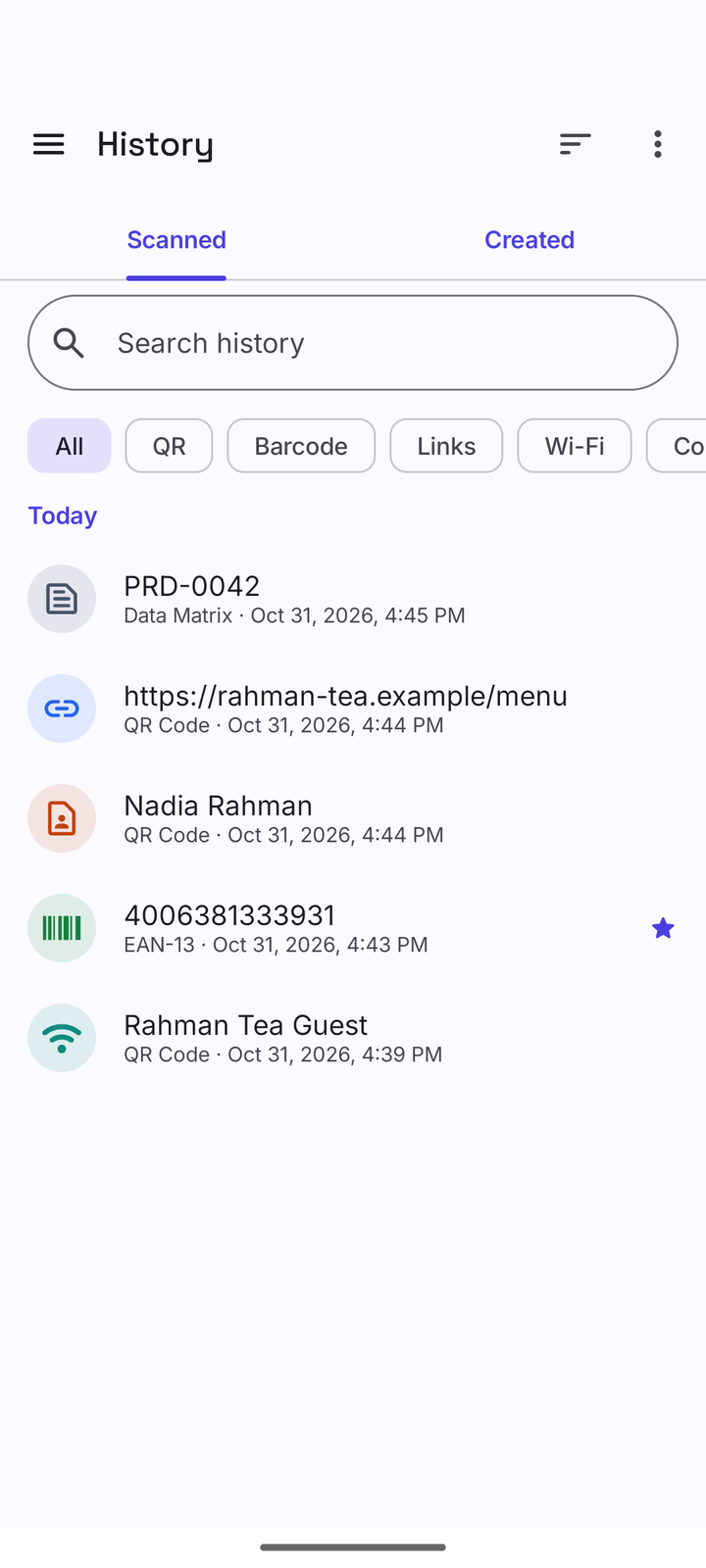
Qirox screenshot: the history of scanned and created codes
HistorySearch, folders, favourites and notes.
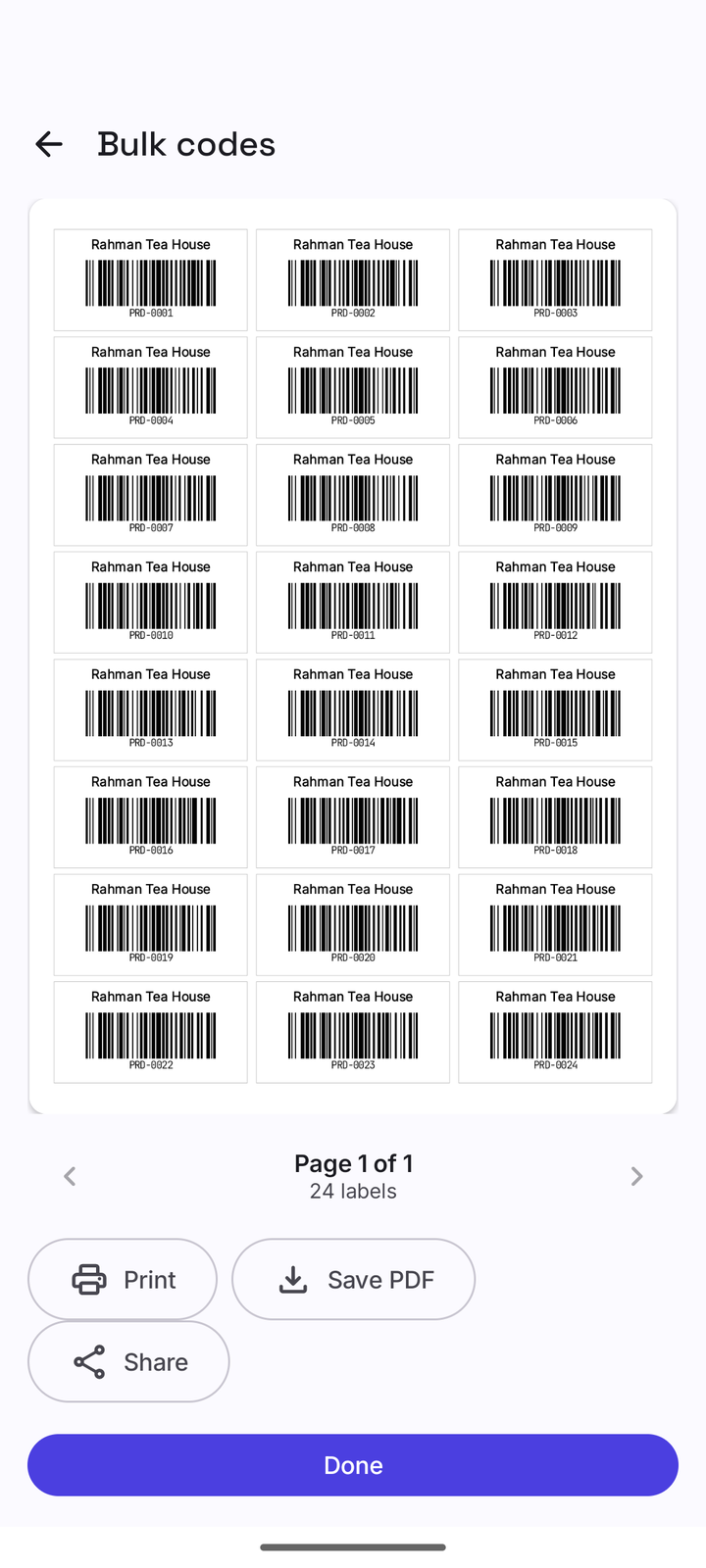
Qirox screenshot: a print preview of a sheet of 24 barcode labels made with the bulk generator
Labels & bulkA sheet of barcode labels, ready to print, save as PDF or share.
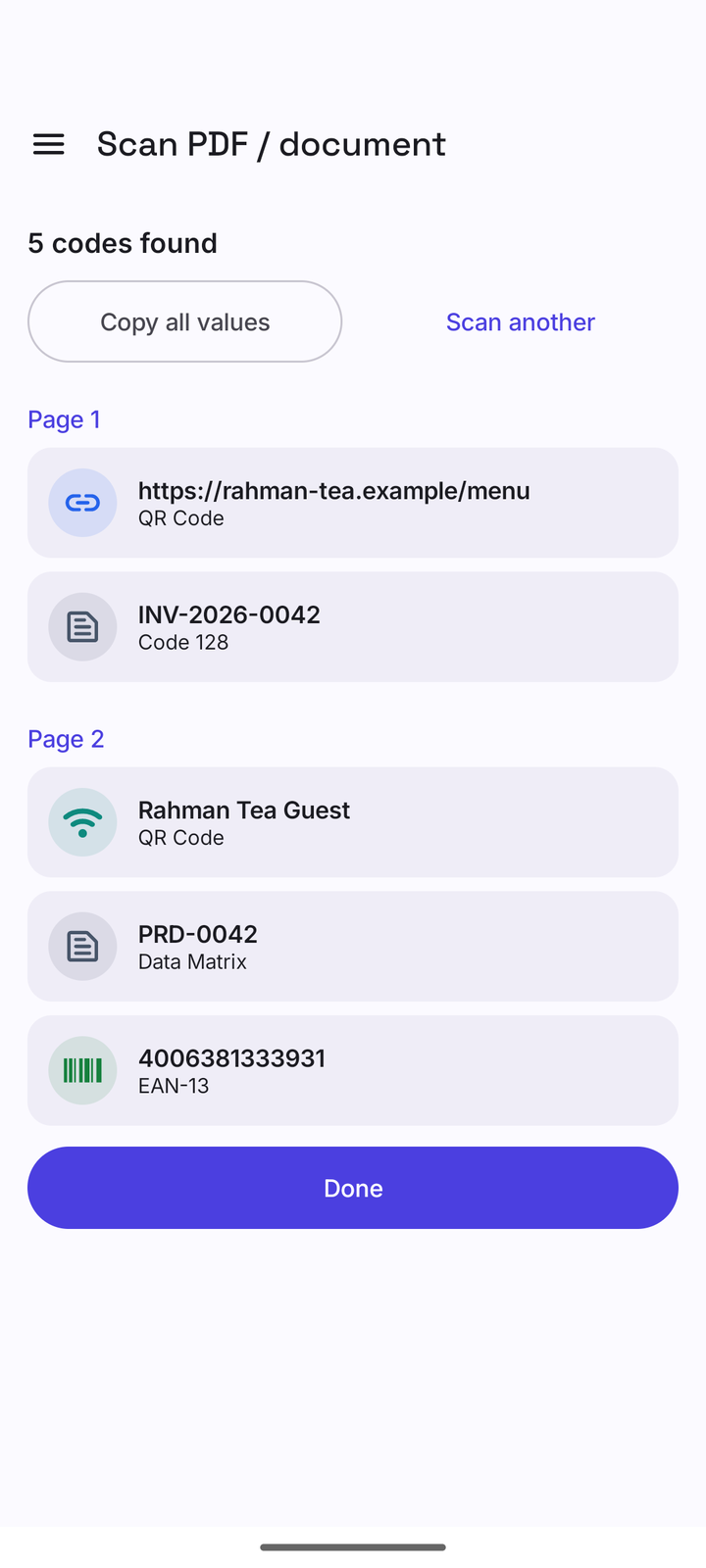
Qirox screenshot: codes found in a PDF document, listed per page
Document scanFind codes in PDFs and photos, page by page.
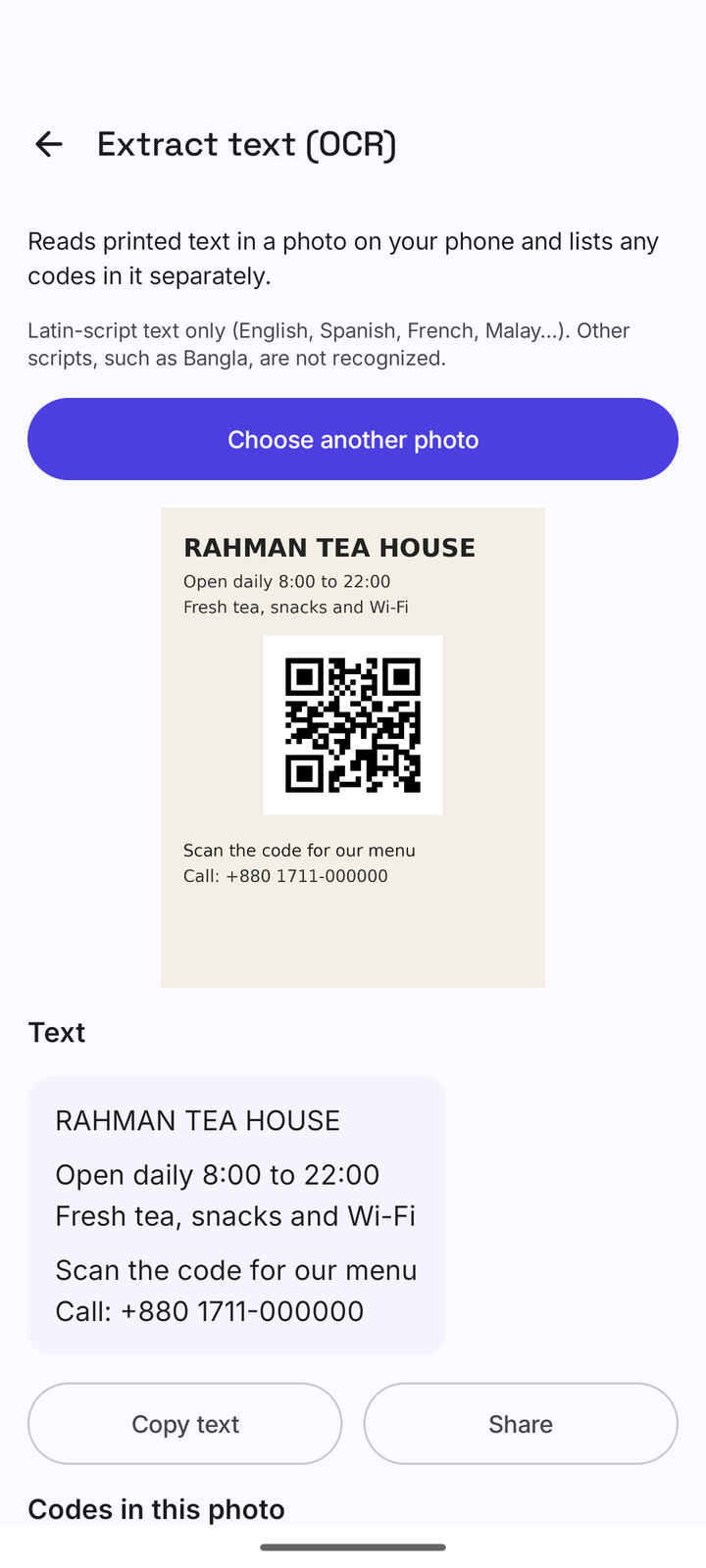
Qirox screenshot: text extracted from a photo with on-device OCR
Extract textOn-device text recognition for Latin-script text.

Scroll sideways to see all eight screens.

Features

Everything for QR codes and barcodes, in one toolkit

Scan, understand, create, print and organize — without an account and without sending your data anywhere.

Create & design

13 QR content types and 13 barcode formats, with a designer for styles, colours, gradients, logos and frames.

  • Quality meter with a self-test: likely scannable, risky or not scannable
  • Export PNG, JPG, SVG or PDF; save, share, print or show full screen

History & organize

Every scan and created code in one place: search, filters, favourites, folders, notes and tags.

  • Multi-select, swipe to delete with undo
  • Export CSV or JSON; optional auto-delete
  • Turn “Save history” off if you prefer

Batch & inventory

Scan many codes in a row in List or Count mode, with duplicate handling and a session summary.

  • Export CSV (UTF-8 with BOM), TXT or JSON

Label maker & print templates

Product, price, shelf, shipping, asset, inventory and name-badge labels on A4/Letter sheets or thermal sizes.

  • Wi-Fi poster, table tent and business-card sheet
  • My QR card: your contact card as a QR code

Bulk generator

Turn a list, a sequence like PRD-0001… or a CSV file into up to 1,000 codes per run.

  • ZIP of PNGs, multi-page PDF or a label sheet

Barcode tools

Check-digit calculator, barcode validator, ISBN-10 ⇄ ISBN-13, UPC-E ⇄ UPC-A, GTIN normalizer and sequential numbers.

  • QR quality check and QR inspector
  • GS1 Application Identifier parser and EMVCo merchant-QR parser

Scan images, PDFs & documents

Scan codes from a photo with crop, rotate and enhance, or from a PDF (first 50 pages) or up to 20 photos.

  • Images shared from other apps open straight in Qirox
  • Photo Picker — no storage permission

Extract text (OCR)

Read text from a photo on your device with a bundled model.

  • Latin-script text only — Bangla and other scripts are not recognized

Smart results & link check

Results understand links, Wi-Fi, contacts, events, products, GS1 data and payment QR codes (display only).

  • Links are never opened automatically by default
  • A basic on-device link check — not a guarantee of safety

Widget, tile & shortcuts

Start scanning from a home-screen widget, the “Scan QR” Quick Settings tile or launcher shortcuts.

  • Share text to Qirox to make a QR code; share an image to scan it
  • Light, dark and AMOLED themes, dynamic colour

App lock & encrypted backup

Lock Qirox with your phone’s own fingerprint, face or screen lock. Back up to a file you choose.

  • Optional password: AES-256-GCM with PBKDF2 (210,000 iterations)
  • No PIN is stored by Qirox

See every feature in detail

Supported formats

Reads 14 formats. Creates QR codes and 13 barcode types.

From retail EAN and UPC to Data Matrix and PDF417. When you create a retail or ITF barcode, the check digit is added for you.

Scan 14 formats

2D

  • QR Code
  • Micro QR
  • Data Matrix
  • Aztec
  • PDF417

1D

  • EAN-8
  • EAN-13
  • UPC-A
  • UPC-E
  • Code 39
  • Code 93
  • Code 128
  • Codabar
  • ITF

Also reads light-on-dark (inverted) codes. Micro QR can be read but not created.

Create QR + 13 barcodes

QR code content types

  • Website
  • Text
  • Wi-Fi
  • Contact
  • Phone
  • SMS
  • E-mail
  • Location
  • Calendar event
  • WhatsApp
  • Telegram
  • App link
  • Custom URI

Barcodes

  • EAN-13
  • EAN-8
  • UPC-A
  • UPC-E
  • Code 128
  • Code 39
  • Code 93
  • Codabar
  • ITF
  • ITF-14
  • Data Matrix
  • PDF417
  • Aztec

How it works

Three steps, no sign-up

  1. 01

    Point and scan

    Qirox opens on the camera. Point it at a code — or pick an image, a PDF or a stack of photos.

  2. 02

    Act on the result

    Open a link after a quick on-device check, join Wi-Fi, save a contact or event, or copy and share — using your phone’s own apps.

  3. 03

    Create, save and print

    Make your own codes and labels, keep everything organized in History, and back it up to a file you choose.

Privacy & ads

Your codes stay on your phone. Ads stay out of your way.

Qirox is free and supported by ads. We are upfront about what that means.

Read the Privacy Policy

On your device

Scanning, code creation and history happen on your device.

No account, no cloud

No account. No cloud sync. Your scans are not uploaded by Qirox.

Honest about ads

Ads are provided by Google AdMob, which may collect device identifiers and usage data. Consent is asked where the law requires it.

Camera only

The camera is the only permission Qirox asks for. Images and files come through Android’s own pickers.

Where ads can and cannot appear in Qirox
Never any adsScanner, scan results, code editors and forms, the menu, the Privacy & ads page, settings sub-pages, app lock.
Where ads can appearBanners at the bottom of some hub and list screens; small native ads labelled “Ad” in longer lists; a full-screen ad only after you finish some tasks (at most one per two finished tasks); an occasional app-open ad.
Never depends on adsScanning, creating, saving, editing, exporting, history and batch work with ads failing, consent denied or no internet.

FAQ

Questions, answered

Is Qirox free? Does it have ads?

Qirox is free and has no in-app purchases. It is supported by ads from Google AdMob. There are no ads on the scanner, scan results, code editors and forms, the menu or the Privacy & ads page. Banners appear at the bottom of some hub and list screens, and a full-screen ad may appear only after you finish certain tasks, with strict limits. You can also watch an optional video for a 60-minute break from ads.

Does Qirox work offline?

Yes. Scanning, creating, designing, exporting, history, batch scanning, document scanning and text recognition all work without an internet connection. The internet is used only for ads and Google’s consent message, and every feature keeps working when ads cannot load.

Which permissions does Qirox need?

The camera is the only permission Qirox asks you for, and only when you use the scanner. Images and files are opened with Android’s Photo Picker and file picker, so Qirox has no storage, contacts, SMS, phone-call or location permission. The ads SDK adds standard permissions such as internet access and the advertising ID; the full list is in the Privacy Policy.

What happens to my scans and data?

Scanning, code creation and history happen on your device. There is no account and no cloud sync, and your scans are not uploaded by Qirox. Qirox data is also left out of Android’s cloud backup — use Backup & restore to save a copy to a file you choose, optionally protected with a password. Ads are provided by Google AdMob, which may collect device identifiers and usage data.

Which languages does Qirox support?

The app’s interface is in English only. Text recognition (OCR) reads Latin-script text only.

Can Qirox read Bangla text with OCR?

No. The bundled text-recognition model reads Latin-script text only, so Bangla and other non-Latin scripts are not recognized. Scanning QR codes and barcodes is not affected.

Which phones are supported?

Android phones running Android 8.0 or newer. Qirox has no tablet-specific layout and is not available for Wear OS or iOS.

Is the link check a safety guarantee? Can Qirox pay with a payment QR?

No to both. The link check is a basic on-device check — not a guarantee of safety — and no link is sent anywhere to check it. Payment QR codes are shown for information only: Qirox never makes payments.

More help on the Support page.

Qirox app icon

Get Qirox for Android

An offline QR and barcode toolkit that opens straight to the scanner.

Download on Google Play

Free · Contains ads · Android 8.0+